Real Estate Postcard QR Codes (Capture Leads From Every Mailing Automatically)
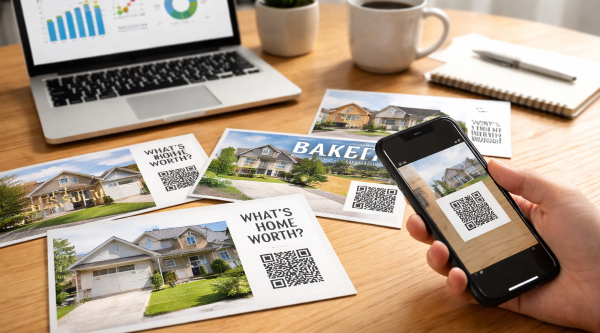
A quick scan turns your postcard into an instant lead — no calls, no typing, no friction.
Real estate postcard QR codes do one powerful thing your postcards alone can’t:
They move someone from “looking” to “clicking.”
Instead of hoping a homeowner calls later, you give them an instant next step right from their phone.
Scan. Tap. Lead captured.
No friction. No remembering your name. No lost opportunities.
If you’re already mailing consistently using your postcard schedule , QR codes are the easiest upgrade you can add this week.
Step 1 — Understand Why QR Codes Work
Modern homeowners don’t call first anymore.
They check.
They scan.
They research quietly.
A QR code matches that behavior perfectly.
- No typing URLs
- No searching your name
- No effort
- Instant access
Lower friction always means higher response.
And higher response means more conversations.
Which means more listings.
Step 2 — Set Up a QR Code in 5 Minutes
Don’t overcomplicate this.
Here’s the simple process:
- Create one landing page (home value, report, or offer)
- Copy the page URL
- Generate a QR code using a free tool
- Download the image
- Place it on your postcard design
That’s it.
You don’t need fancy software or custom tech.
The magic isn’t the code itself — it’s where you send people.
Step 3 — Place the QR Code Where People Actually Notice It
A QR code only works if people see it.
Too many agents tuck it into a corner like fine print. That kills scans.
Treat your QR like a call-to-action button, not decoration.
- Make it at least 1 inch wide
- Use strong contrast (black on white works best)
- Give it breathing room (don’t crowd it with text)
- Place it near your main headline or offer
Think top-right, bottom-right, or directly under your main promise.
If it looks important, people treat it as important.
If it looks optional, they ignore it.
Step 4 — Tell Them Why to Scan (Your CTA Matters)
Here’s the truth: people don’t scan QR codes just because they exist.
They scan because there’s a benefit.
Never label it “Scan Me.”
Instead, promise something specific:
- Scan for Your Instant Home Value
- See What Your Neighbor’s Home Sold For
- Get This Month’s Market Update
- Claim Your Free Seller Checklist
Specific beats clever every time.
One clear promise can double or triple scan rates compared to a generic label.
Remember: the QR isn’t the star. The offer is.
Step 5 — Send Them to ONE Clear Offer (Not Your Homepage)
Big mistake: linking to your homepage.
That’s like inviting someone into a store and giving them no directions.
Instead, give them one obvious action.
Great postcard landing pages include:
- “Get Your Home Value in 30 Seconds”
- “See Recent Sales in Your Neighborhood”
- “Free Seller Prep Checklist”
- “Request a Private Market Update”
One page. One message. One button.
Simple converts better.
If you need messaging ideas, borrow from these postcard scripts and templates so your copy stays tight.
Step 6 — Track Every Scan Automatically
Here’s where QR codes become incredibly powerful.
Every scan becomes data.
You can see:
- how many people scanned
- which postcard performed best
- which neighborhood responds most
- which offers get clicks
Now your marketing isn’t guessing — it’s measurable.
Pair this with your ROI tracking system and you’ll know exactly what each mailing produces.
That’s when farming becomes predictable.
Step 7 — Turn Scans Into Listings
A scan alone doesn’t make you money.
The follow-up does.
When someone scans:
- capture their email
- send an instant value report
- follow up with a short sequence
- offer a quick call or consultation
Now your postcard isn’t just “branding.”
It’s a lead magnet.
And when you repeat this monthly, your farm starts feeding you contacts automatically.
Add QR codes once… and every future mailing works harder without extra effort.
For the full system — frequency, scripts, tracking, and scaling — visit the Real Estate Postcards Hub .
Step 8 — Use Simple Tools (Don’t Overthink the Tech)
Good news: you don’t need complicated software to make QR codes work.
Most agents get stuck trying to “perfect” the tech. Don’t.
Keep it simple and move fast.
- Free QR generators for creating codes in seconds
- A basic landing page builder or form tool
- Email capture connected to your CRM
- Google Analytics or built-in scan tracking
That’s it.
If you can send email and build one page, you already have everything you need.
Remember: postcards make you visible. QR codes make you measurable. Systems make you scalable.
Focus on consistency, not complexity. The agents who win aren’t more technical — they just show up every month and let the system compound.
More Real Estate Postcard Resources

"Remember! Consistency wins. Real estate postcard QR codes simply make it easier for the right people to find you first."
Home > Real Estate Postcards > Real Estate Postcard QR Codes
🔥Top Pages in August 2026

💌 Expired Listing Letters →
Send the message that gets sellers calling you back
📝 Email Marketing for Real Estate Agents →
Send emails that spark replies and start real conversations
🏷️ Real Estate Agent Directory →
Get discovered by buyers, sellers, and referral partners searching for agents
🏷️Real Estate Marketing Talk Blog →
Get fresh ideas that help agents grow, connect, and win more business
📬Real Estate Website Content →
Simple System. Uncommon Results.
🚪 Your Gateway to Targeted Insights

👔 For Agents →
Branding tips, lead gen strategies & marketing tools to grow your business
🏡 For Buyers → Smart buying guides, market insights & negotiation tips for your next move
📦 For Sellers → Listing prep, pricing strategies & proven tactics to sell fast and profitably
💰 For Investors → ROI-focused content, property analysis tools & market trend breakdowns